 SUNNY
SUNNYA handwritten variable font by Sunny
SUNNY MARKER
SMALL NOTES. BIG PERSONALITY.
Make it your own.
Type your own words. Drag a slider. Find your kind of Sunny.
More options & CSS
Adjusts spacing and small details for the size you use.
A little Sunny, in the wild.
Small notes, useful labels, and room to play.

In the margins
A few small notes, with room to breathe.

Small but mighty
Condensed lettering for labels and little spaces.

Wide open
Expanded headlines with a softer lowercase note.
Every little character.
391 glyphs. Letters, accents, arrows, and the little extras.
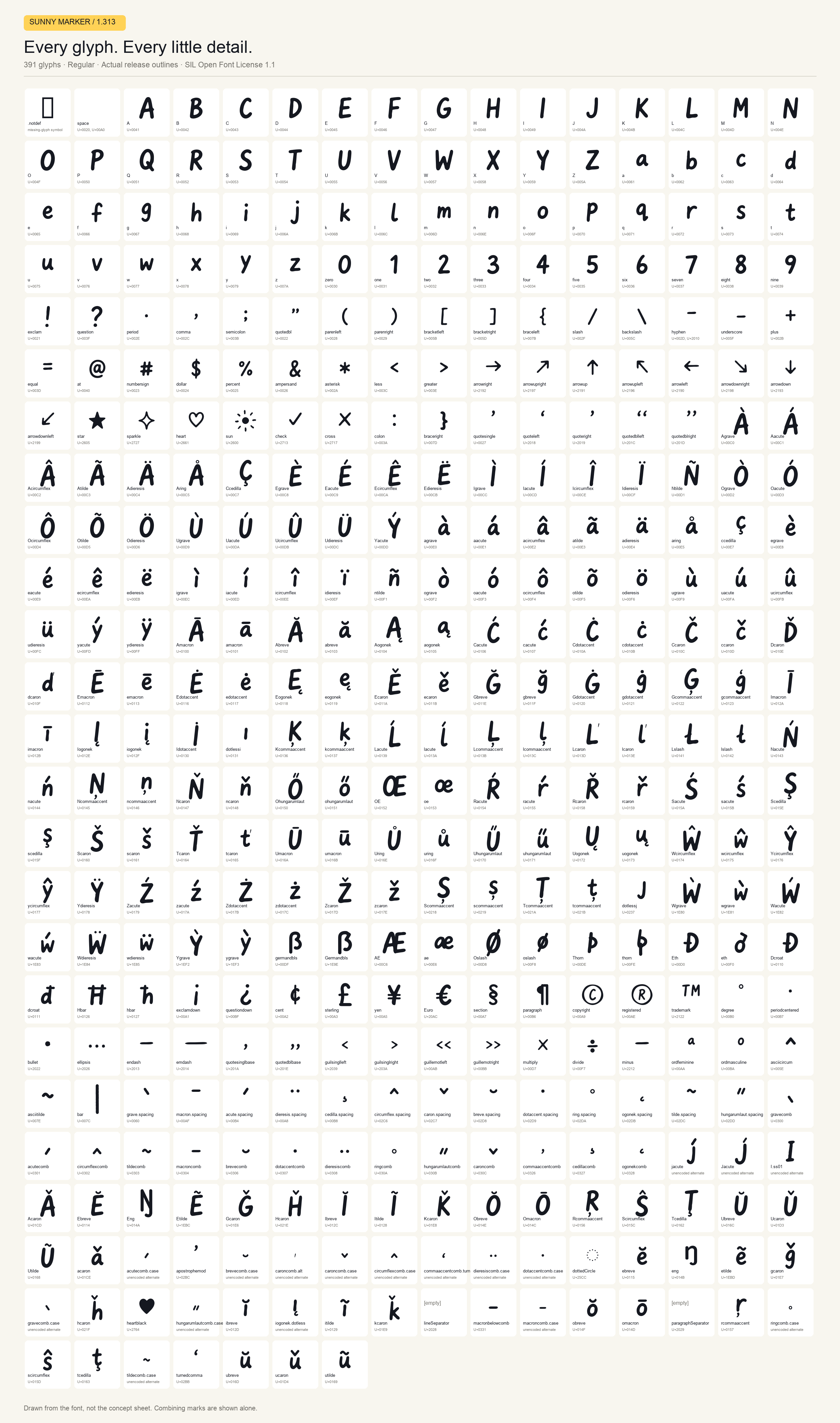
- AU+0041
- BU+0042
- CU+0043
- DU+0044
- EU+0045
- FU+0046
- GU+0047
- HU+0048
- IU+0049
- JU+004A
- KU+004B
- LU+004C
- MU+004D
- NU+004E
- OU+004F
- PU+0050
- QU+0051
- RU+0052
- SU+0053
- TU+0054
- UU+0055
- VU+0056
- WU+0057
- XU+0058
- YU+0059
- ZU+005A
- aU+0061
- bU+0062
- cU+0063
- dU+0064
- eU+0065
- fU+0066
- gU+0067
- hU+0068
- iU+0069
- jU+006A
- kU+006B
- lU+006C
- mU+006D
- nU+006E
- oU+006F
- pU+0070
- qU+0071
- rU+0072
- sU+0073
- tU+0074
- uU+0075
- vU+0076
- wU+0077
- xU+0078
- yU+0079
- zU+007A
- zeroU+0030
- oneU+0031
- twoU+0032
- threeU+0033
- fourU+0034
- fiveU+0035
- sixU+0036
- sevenU+0037
- eightU+0038
- nineU+0039
- exclamU+0021
- questionU+003F
- periodU+002E
- commaU+002C
- semicolonU+003B
- quotedblU+0022
- parenleftU+0028
- parenrightU+0029
- bracketleftU+005B
- bracketrightU+005D
- braceleftU+007B
- slashU+002F
- backslashU+005C
- hyphenU+002D, U+2010
- underscoreU+005F
- plusU+002B
- equalU+003D
- atU+0040
- numbersignU+0023
- dollarU+0024
- percentU+0025
- ampersandU+0026
- asteriskU+002A
- lessU+003C
- greaterU+003E
- arrowrightU+2192
- arrowuprightU+2197
- arrowupU+2191
- arrowupleftU+2196
- arrowleftU+2190
- arrowdownrightU+2198
- arrowdownU+2193
- arrowdownleftU+2199
- starU+2605
- sparkleU+2727
- heartU+2661
- sunU+2600
- checkU+2713
- crossU+2717
- colonU+003A
- bracerightU+007D
- quotesingleU+0027
- quoteleftU+2018
- quoterightU+2019
- quotedblleftU+201C
- quotedblrightU+201D
- AgraveU+00C0
- AacuteU+00C1
- AcircumflexU+00C2
- AtildeU+00C3
- AdieresisU+00C4
- AringU+00C5
- CcedillaU+00C7
- EgraveU+00C8
- EacuteU+00C9
- EcircumflexU+00CA
- EdieresisU+00CB
- IgraveU+00CC
- IacuteU+00CD
- IcircumflexU+00CE
- IdieresisU+00CF
- NtildeU+00D1
- OgraveU+00D2
- OacuteU+00D3
- OcircumflexU+00D4
- OtildeU+00D5
- OdieresisU+00D6
- UgraveU+00D9
- UacuteU+00DA
- UcircumflexU+00DB
- UdieresisU+00DC
- YacuteU+00DD
- agraveU+00E0
- aacuteU+00E1
- acircumflexU+00E2
- atildeU+00E3
- adieresisU+00E4
- aringU+00E5
- ccedillaU+00E7
- egraveU+00E8
- eacuteU+00E9
- ecircumflexU+00EA
- edieresisU+00EB
- igraveU+00EC
- iacuteU+00ED
- icircumflexU+00EE
- idieresisU+00EF
- ntildeU+00F1
- ograveU+00F2
- oacuteU+00F3
- ocircumflexU+00F4
- otildeU+00F5
- odieresisU+00F6
- ugraveU+00F9
- uacuteU+00FA
- ucircumflexU+00FB
- udieresisU+00FC
- yacuteU+00FD
- ydieresisU+00FF
- AmacronU+0100
- amacronU+0101
- AbreveU+0102
- abreveU+0103
- AogonekU+0104
- aogonekU+0105
- CacuteU+0106
- cacuteU+0107
- CdotaccentU+010A
- cdotaccentU+010B
- CcaronU+010C
- ccaronU+010D
- DcaronU+010E
- dcaronU+010F
- EmacronU+0112
- emacronU+0113
- EdotaccentU+0116
- edotaccentU+0117
- EogonekU+0118
- eogonekU+0119
- EcaronU+011A
- ecaronU+011B
- GbreveU+011E
- gbreveU+011F
- GdotaccentU+0120
- gdotaccentU+0121
- GcommaaccentU+0122
- gcommaaccentU+0123
- ImacronU+012A
- imacronU+012B
- IogonekU+012E
- iogonekU+012F
- IdotaccentU+0130
- dotlessiU+0131
- KcommaaccentU+0136
- kcommaaccentU+0137
- LacuteU+0139
- lacuteU+013A
- LcommaaccentU+013B
- lcommaaccentU+013C
- LcaronU+013D
- lcaronU+013E
- LslashU+0141
- lslashU+0142
- NacuteU+0143
- nacuteU+0144
- NcommaaccentU+0145
- ncommaaccentU+0146
- NcaronU+0147
- ncaronU+0148
- OhungarumlautU+0150
- ohungarumlautU+0151
- OEU+0152
- oeU+0153
- RacuteU+0154
- racuteU+0155
- RcaronU+0158
- rcaronU+0159
- SacuteU+015A
- sacuteU+015B
- ScedillaU+015E
- scedillaU+015F
- ScaronU+0160
- scaronU+0161
- TcaronU+0164
- tcaronU+0165
- UmacronU+016A
- umacronU+016B
- UringU+016E
- uringU+016F
- UhungarumlautU+0170
- uhungarumlautU+0171
- UogonekU+0172
- uogonekU+0173
- WcircumflexU+0174
- wcircumflexU+0175
- YcircumflexU+0176
- ycircumflexU+0177
- YdieresisU+0178
- ZacuteU+0179
- zacuteU+017A
- ZdotaccentU+017B
- zdotaccentU+017C
- ZcaronU+017D
- zcaronU+017E
- ScommaaccentU+0218
- scommaaccentU+0219
- TcommaaccentU+021A
- tcommaaccentU+021B
- dotlessjU+0237
- WgraveU+1E80
- wgraveU+1E81
- WacuteU+1E82
- wacuteU+1E83
- WdieresisU+1E84
- wdieresisU+1E85
- YgraveU+1EF2
- ygraveU+1EF3
- germandblsU+00DF
- GermandblsU+1E9E
- AEU+00C6
- aeU+00E6
- OslashU+00D8
- oslashU+00F8
- ThornU+00DE
- thornU+00FE
- EthU+00D0
- ethU+00F0
- DcroatU+0110
- dcroatU+0111
- HbarU+0126
- hbarU+0127
- exclamdownU+00A1
- questiondownU+00BF
- centU+00A2
- sterlingU+00A3
- yenU+00A5
- EuroU+20AC
- sectionU+00A7
- paragraphU+00B6
- copyrightU+00A9
- registeredU+00AE
- trademarkU+2122
- degreeU+00B0
- periodcenteredU+00B7
- bulletU+2022
- ellipsisU+2026
- endashU+2013
- emdashU+2014
- quotesinglbaseU+201A
- quotedblbaseU+201E
- guilsinglleftU+2039
- guilsinglrightU+203A
- guillemotleftU+00AB
- guillemotrightU+00BB
- multiplyU+00D7
- divideU+00F7
- minusU+2212
- ordfeminineU+00AA
- ordmasculineU+00BA
- asciicircumU+005E
- asciitildeU+007E
- barU+007C
- grave.spacingU+0060
- macron.spacingU+00AF
- acute.spacingU+00B4
- dieresis.spacingU+00A8
- cedilla.spacingU+00B8
- circumflex.spacingU+02C6
- caron.spacingU+02C7
- breve.spacingU+02D8
- dotaccent.spacingU+02D9
- ring.spacingU+02DA
- ogonek.spacingU+02DB
- tilde.spacingU+02DC
- hungarumlaut.spacingU+02DD
- gravecombU+0300
- acutecombU+0301
- circumflexcombU+0302
- tildecombU+0303
- macroncombU+0304
- brevecombU+0306
- dotaccentcombU+0307
- dieresiscombU+0308
- ringcombU+030A
- hungarumlautcombU+030B
- caroncombU+030C
- commaaccentcombU+0326
- cedillacombU+0327
- ogonekcombU+0328
- jacutealternate
- Jacutealternate
- I.ss01alternate
- AcaronU+01CD
- EbreveU+0114
- EngU+014A
- EtildeU+1EBC
- GcaronU+01E6
- HcaronU+021E
- IbreveU+012C
- ItildeU+0128
- KcaronU+01E8
- ObreveU+014E
- OmacronU+014C
- RcommaaccentU+0156
- ScircumflexU+015C
- TcedillaU+0162
- UbreveU+016C
- UcaronU+01D3
- UtildeU+0168
- acaronU+01CE
- acutecomb.casealternate
- apostrophemodU+02BC
- brevecomb.casealternate
- caroncomb.altalternate
- caroncomb.casealternate
- circumflexcomb.casealternate
- commaaccentcomb.turnalternate
- dieresiscomb.casealternate
- dotaccentcomb.casealternate
- dottedCircleU+25CC
- ebreveU+0115
- engU+014B
- etildeU+1EBD
- gcaronU+01E7
- gravecomb.casealternate
- hcaronU+021F
- heartblackU+2764
- hungarumlautcomb.casealternate
- ibreveU+012D
- iogonek.dotlessalternate
- itildeU+0129
- kcaronU+01E9
- lineSeparatorU+2028
- macronbelowcombU+0331
- macroncomb.casealternate
- obreveU+014F
- omacronU+014D
- paragraphSeparatorU+2029
- rcommaaccentU+0157
- ringcomb.casealternate
- scircumflexU+015D
- tcedillaU+0163
- tildecomb.casealternate
- turnedcommaU+02BB
- ubreveU+016D
- ucaronU+01D4
- utildeU+0169
- .notdefmissing glyph
- spaceU+0020, U+00A0
Glyph names and Unicode values · Combining marks and alternates are shown individually. Use arrow keys to browse the grid.
ADD A LITTLE SUNNY.
Run the install command inside your app’s folder, then import the stylesheet. A global npm install does not connect the font to your project.
import "@sunnyai/sunny-marker/css";Using Next.js?
import { SunnyMarker } from "@sunnyai/sunny-marker/next";
Use SunnyMarker.className on your note, or
SunnyMarker.variable for a CSS variable.
Setup and variable controls ↗ · Variable desktop (.ttf) ↓ · Static desktop (.otf) ↓